


Description
Room Temperature Control Panel for Compatible VAV Systems
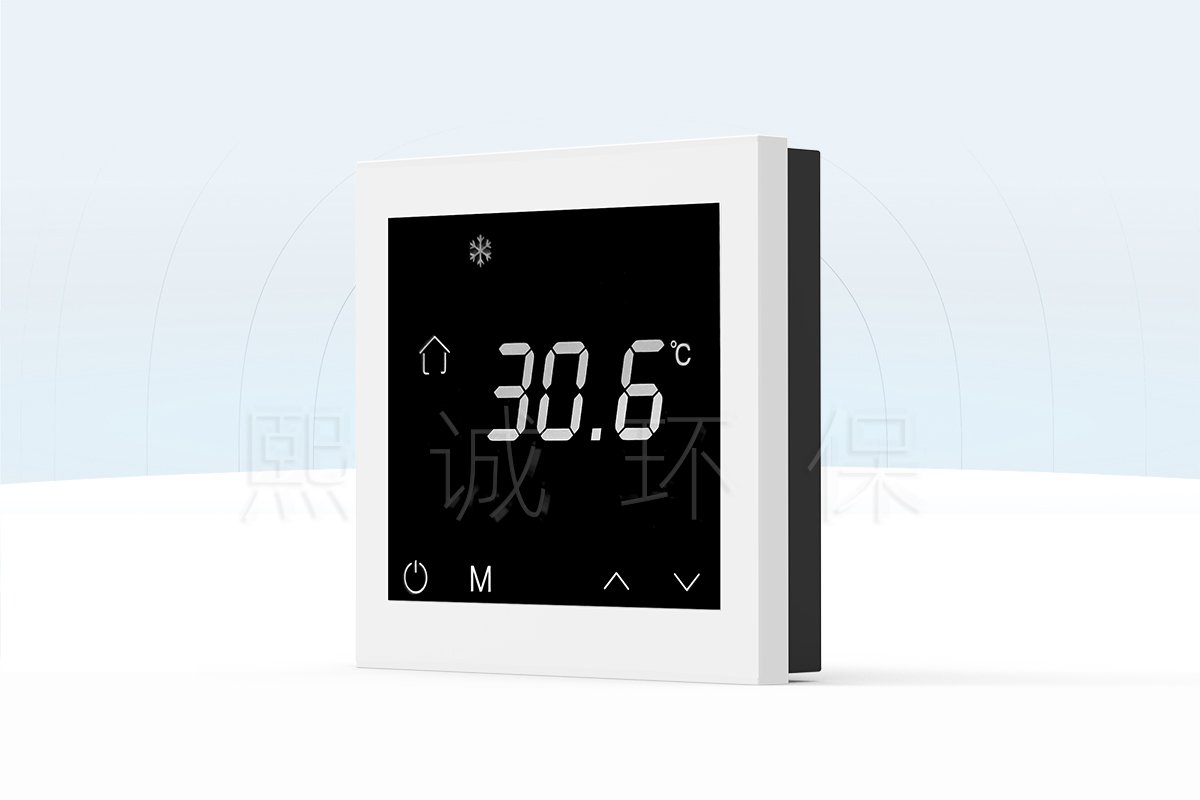
The THM-S2 room temperature control panel is an 86-type local interface used with a compatible integrated VAV controller. It gives the occupied space a clear temperature and operating-status view while the connected controller remains responsible for the actual airflow, damper, heating/cooling sequence and BMS communication. This separation prevents the wall panel from being incorrectly specified as a stand-alone HVAC controller.
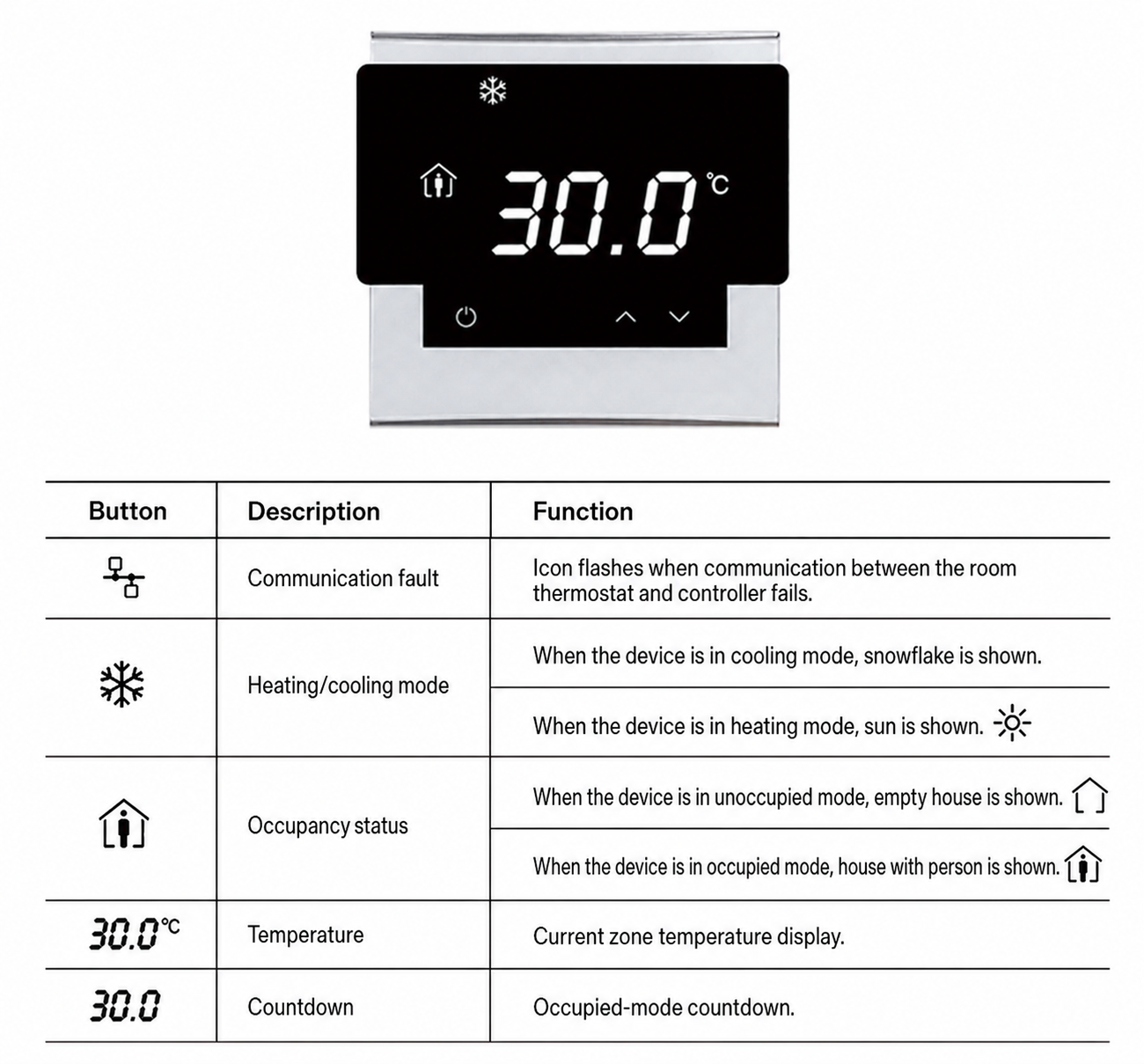
The panel uses Modbus communication and displays current zone temperature, heating/cooling, occupancy status, countdown and communication-fault indication. The delivered application must specify which functions are enabled, what setpoint range is allowed and how the panel relates to the selected VAV terminal control sequence.
Buyer Decisions Before Ordering
- Confirm the compatible controller and the required room/VAV application.
- Define whether local users may adjust temperature, change mode or request occupancy override.
- State the network/Modbus arrangement and controller address documentation.
- Identify the wall-box location, cable route and installation quantity.
Display, Status and Local Interaction
Temperature and Mode Status
The panel shows the current zone temperature and identifies heating/cooling mode through the relevant icon. A displayed temperature is useful only when the selected control system defines the room sensor and its location. The panel does not correct poor sensor placement, an incorrect controller configuration or a VAV terminal that cannot deliver the required airflow.
Occupancy, Countdown and Communication Fault
The display includes distinct occupied/unoccupied icons, an occupied-mode countdown and a flashing communication-fault icon. These are operational cues, not complete diagnostics. When a communication fault appears, inspect the panel connection, controller power, network path and controller state under the approved service procedure rather than assuming the room temperature itself is at fault.
Controller and Modbus Integration
THM-S2 uses Modbus communication and a 6-core crystal plug connection to a compatible integrated VAV controller. Confirm the controller model, cable arrangement, panel address if applicable, point mapping and sequence before ordering. A similarly shaped wall thermostat is not automatically compatible.
Local Panel and Supervisory Control
Define whether the local panel can change a target temperature or operating state, and whether a BMS command can override that setting. The controller/BMS sequence must resolve priority so users do not see a local value that is immediately superseded by a supervisory schedule. Keep the panel tag and controller tag together in the as-built documentation.
Room Interface Within a VAV Control System
A room temperature panel and a VAV damper/control assembly have different jobs. The panel gives occupants and facilities staff a local view of temperature, mode, occupancy and communication status. The compatible integrated VAV controller receives the panel connection and carries the terminal sequence. The air-side equipment then responds through its selected damper, actuator, sensor and control arrangement. Keeping those roles separate avoids treating a wall panel as a complete terminal controller.
Where It Fits in the XICHENG VAV Range
XICHENG’s VAV product range separates fume hood airflow control, duct airflow control and controller arrangements that use an external actuator. A THM-S2 is relevant when the selected integrated VAV control arrangement calls for a local room temperature/status interface. It is not a direct control replacement for a fume hood face-velocity controller, a fume hood sash-control system, a duct airflow controller or an actuator. Those items determine the air-side sequence; this panel provides the configured room-side interaction.
Selection Questions That Prevent Misapplication
- Which integrated VAV controller accepts the panel’s 6-core plug and Modbus communication path?
- Is the controlled space a room, zone or terminal application, and which temperature point is displayed?
- Which functions are view-only, locally adjustable or locked by the supervisory sequence?
- Which air-side controller, damper/actuator and sensor arrangement carries out the final airflow response?
- Does the project require only local temperature/status visibility, or a documented occupied/unoccupied override and countdown function?
Answer these questions before selecting the panel quantity and wall-box locations. They also define what should be tested at commissioning: a valid panel display, the expected controller response and the correct BMS priority are separate acceptance checks.
Wall-Box Installation
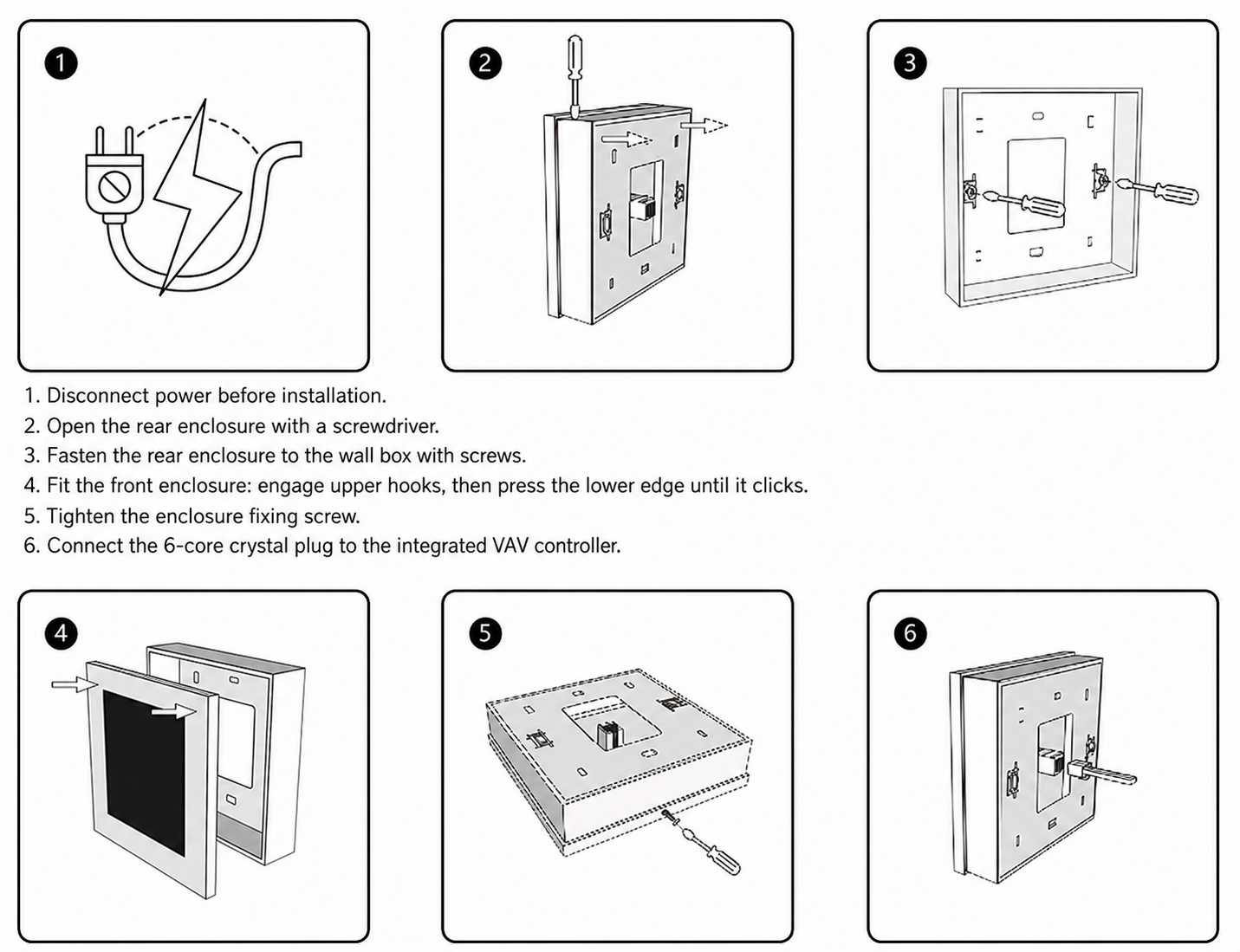
Disconnect power before installation. Open the rear enclosure, fasten it to the wall box, engage the front enclosure, tighten the fixing screw and connect the 6-core crystal plug to the integrated VAV controller. Follow the issued electrical documentation and protect the plug/cable from strain or damage inside the wall box.
Commissioning Checks
- Verify panel power and communication with the intended controller.
- Compare the displayed room temperature with the approved sensor/control-point value.
- Check heating/cooling and occupancy icons against the configured sequence.
- Test only the local adjustment or override functions authorized for the project.
Selection and Application Fit
Select this room temperature control panel when an integrated VAV controller requires a local, wall-mounted temperature/status interface. It is appropriate for a configured room or VAV terminal application, not as a direct replacement for a generic line-voltage thermostat, fan-coil controller or standalone building controller. Provide the selected controller, room function, local permissions, Modbus requirement and project wiring details with the enquiry.
Related VAV Controller
For the terminal-control side of the system, review the Laboratory VAV Terminal Controller. The room panel complements that type of control architecture but does not replace its actuator, sensor or terminal sequence.
Fault and Service Boundary
A communication icon identifies a problem between the panel and controller, not necessarily a failed temperature sensor or VAV terminal. Service should check power, the plug connection, cable condition, controller state and documented settings in that order. Keep the panel location, connected controller tag and final wiring record with the equipment file so a replacement can be identified without guessing at compatibility.
Acceptance Evidence
Record the panel tag, room or terminal location, controller tag, enabled functions and connection details. During acceptance, demonstrate that displayed temperature and status icons follow the intended controller sequence. A panel that powers up is not automatically evidence that the connected VAV terminal, room sensor or schedule operates correctly.
Frequently Asked Questions
Is THM-S2 a stand-alone thermostat?
No. It is a room temperature display and control interface for a compatible integrated VAV controller. The connected controller carries the actual control sequence.
What can the panel show?
The panel displays current zone temperature, heating/cooling state, occupancy state, countdown and communication-fault indication. Enabled functions depend on the selected controller configuration.
How is the panel connected?
THM-S2 uses a 6-core crystal plug connection to a compatible integrated VAV controller and supports Modbus communication. Confirm final wiring and compatibility in the project documentation.
Contact the Xicheng Engineering Team
Send the compatible VAV controller, room application, required display and local-adjustment functions, Modbus/network requirement, mounting quantity and wiring information. Xicheng can confirm the applicable THM-S2 room temperature panel configuration and pricing.
Shenzhen Office: No. 34 Zhenxing Road (Shengtaian Heavy Industrial Park B), Loucun, Guangming New Dist, Shenzhen, Guangdong, China
WhatsApp: +86 18126478161
Engineering Mailbox: fanalax34@gmail.com