


Description
Key Specifications and First Selection
A microscope table is selected around the relationship between the operator, the eyepieces or display, the microscope, the sample and the supporting structure. The first decision is whether the application needs an ergonomic stable table or a system with a defined vibration-isolation mechanism. A heavy frame, levelling feet and a well-supported top can improve stability, but do not by themselves provide the natural-frequency or transmission performance of a specified isolation platform.
| Selection field | Decision required | Why it changes the table | Confirmation before release |
|---|---|---|---|
| Microscope task | Routine viewing, imaging, micromanipulation, IVF/ICSI, confocal or scanning work | Defines posture, recess, stability and accessory needs | Model, objective use, operator position and operating sequence |
| Geometry | Width, depth, work recess, height and knee clearance | Controls eye position, reach and equipment support | Finished worktop height and instrument footprint |
| Support condition | Rigid frame, passive, pneumatic or active isolation | Determines load, power or air, and vibration acceptance | Required mechanism, load distribution and room conditions |
| Services | Power, controller, foot switch, monitor, air and cables | Can bypass isolation or obstruct adjustments | Cable slack, hose flexibility, outlet and maintenance path |
Reference dimensions and planning limits
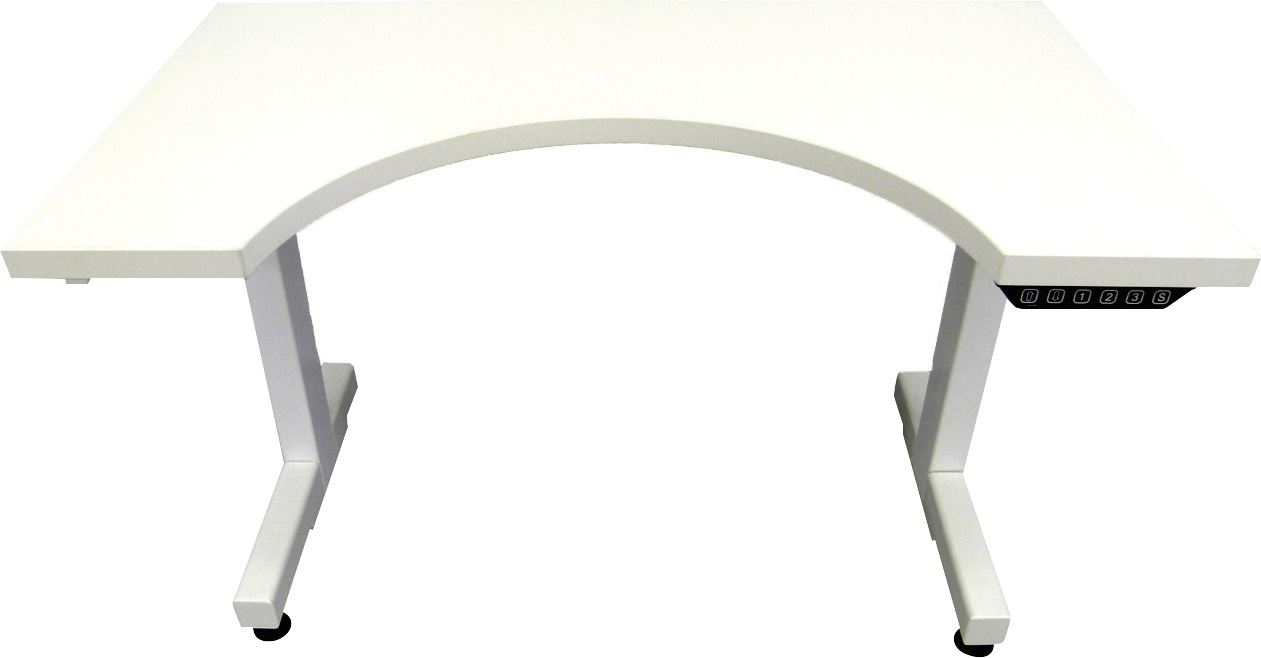
One electric microscopy desk family uses 900-1800 mm widths, 600 or 800 mm depths, 670-1320 mm electric height, a 740 x 200 mm curved recess and a 240 kg published desk load. Other microscope-table families use 48, 60 or 72 inch widths, 30 or 36 inch depths, a 12 inch adjustment travel or separate embedded isolation platforms. These are separate references, not a combined catalogue specification. The final laboratory microscope table must bind its worktop, lift mechanism, load and isolation method to one selected configuration.
First decide whether isolation is required
Ask whether vibration is visibly affecting imaging or manipulation, whether the building has floor or nearby-equipment vibration, and whether the microscope includes pumps, fans, moving stages or long exposures. If isolation is required, identify the mechanism and its allowed load, centre of gravity, platform size, supply requirements and test condition. For an analytical balance or weighing task, use the distinct anti-vibration balance table rather than using microscope terminology as a substitute.
Ergonomics, Height and Work Recess
Microscope work is unusually sensitive to small posture errors because the operator may remain at the eyepieces, camera display or manipulation controls for long periods. The usable height is not simply the height of a table leg. It is the relationship among chair range, knee clearance, worktop thickness, microscope base, optical viewing height, monitor position and the reach required for focus, sample handling and controls. A laboratory microscope table should be configured from that complete working position.
Work recess and viewing position
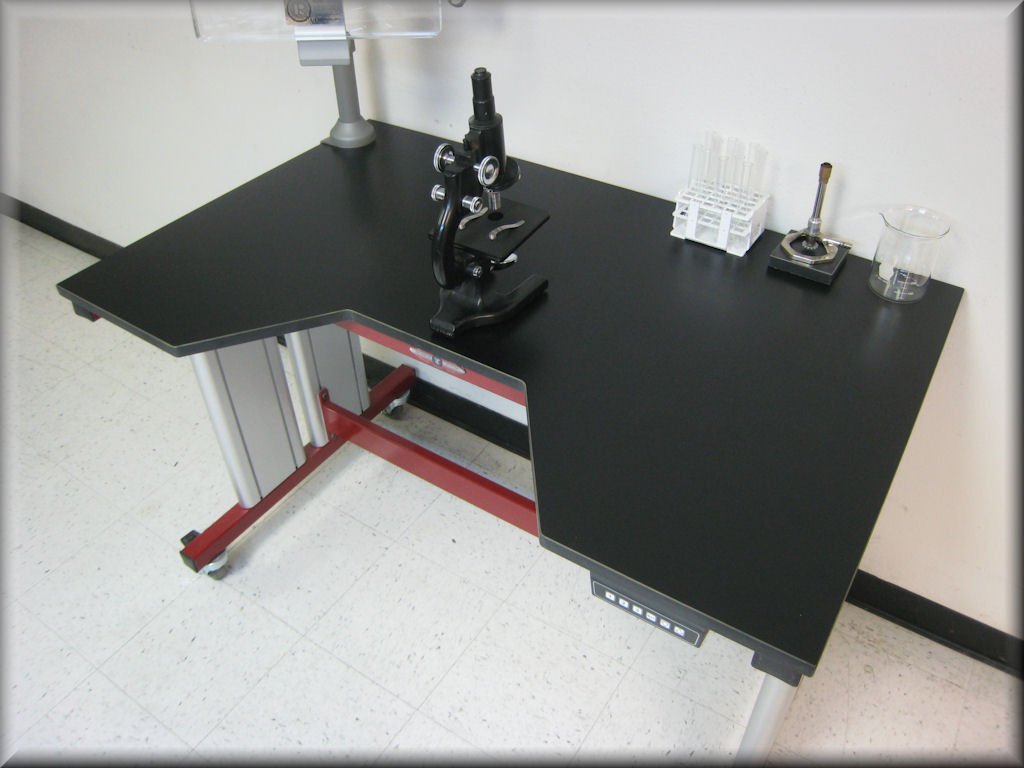
A curved or straight work recess can bring the microscope closer to the operator without forcing the chair, torso or forearms into an awkward position. A reference electric microscopy desk uses a 740 x 200 mm curved recess. The recess shape, top edge and equipment placement must still be checked against the microscope footprint and any monitor arm, keyboard, foot switch or stage-control device. A recess that improves one instrument arrangement can restrict a different base or accessory layout.
Fixed, manual and electric height
A fixed-height microscope workstation is appropriate only when the users, microscope height and seating arrangement are known and repeatable. Manual height adjustment can suit shared areas with less frequent changes. Electric adjustment is useful where several operators use the table, where seated and standing tasks alternate, or where the work height must be set deliberately around a particular optical setup. Published electric-desk ranges should be treated as a starting point: the installed travel, load, controller, collision protection and worktop arrangement must be confirmed together.
Where the primary need is a broadly adjustable work surface rather than a microscope-specific layout, the height-adjustable laboratory bench may be the more direct starting point. A microscope table needs the additional optical-workstation review described on this page.
Chair, foot switch and lower-zone clearance
The lower zone must allow the chair, feet and any foot-operated control to move without striking a cross member, cable tray or service hose. A microscope system can include a foot switch, camera control, illumination control or stage device. Their locations should be decided before finalising the base frame. Put power strips, control boxes and cable management where they remain accessible but do not reduce leg clearance or make the chair position asymmetric.
Monitor and accessory reach
When the operator works from a camera display, monitor height and viewing distance can change the required worktop geometry. Microscopes with articulated arms, external illumination, specimen heaters, micromanipulators or image-acquisition hardware need a clear accessory zone, not merely unused tabletop area. Identify the items that remain permanently on the table and the items that move during operation. This prevents a nominally large worktop from becoming an impractical microscope workstation after installation.
Equipment Support, Load and Vibration Selection
The support structure has to carry the complete operating arrangement, not only the catalogue mass of the microscope. Include the microscope, optical accessories, camera, monitor arm, illumination, sample equipment, platform, cables, hoses and the way the load is distributed. Centre of gravity matters particularly when a microscope sits near an edge, on a cantilevered accessory shelf or on a vibration-isolation platform with a defined load zone.
Rigid support and isolation are different selections
A rigid laboratory table can be the correct choice for routine viewing, documentation or teaching where the room environment and procedure do not require a stated isolation result. Passive, pneumatic and active isolation systems are separate mechanisms. They use different mounting arrangements, load windows, service needs and acceptance methods. The selected microscope table should name the mechanism where one is required rather than using a general phrase such as “anti-vibration” without a defined configuration.
| Support direction | Suitable planning use | Additional information needed | Do not assume |
|---|---|---|---|
| Rigid frame with levelling | General microscopy where stable geometry is the main requirement | Frame construction, top, feet, total load and floor condition | That it supplies a measured isolation performance |
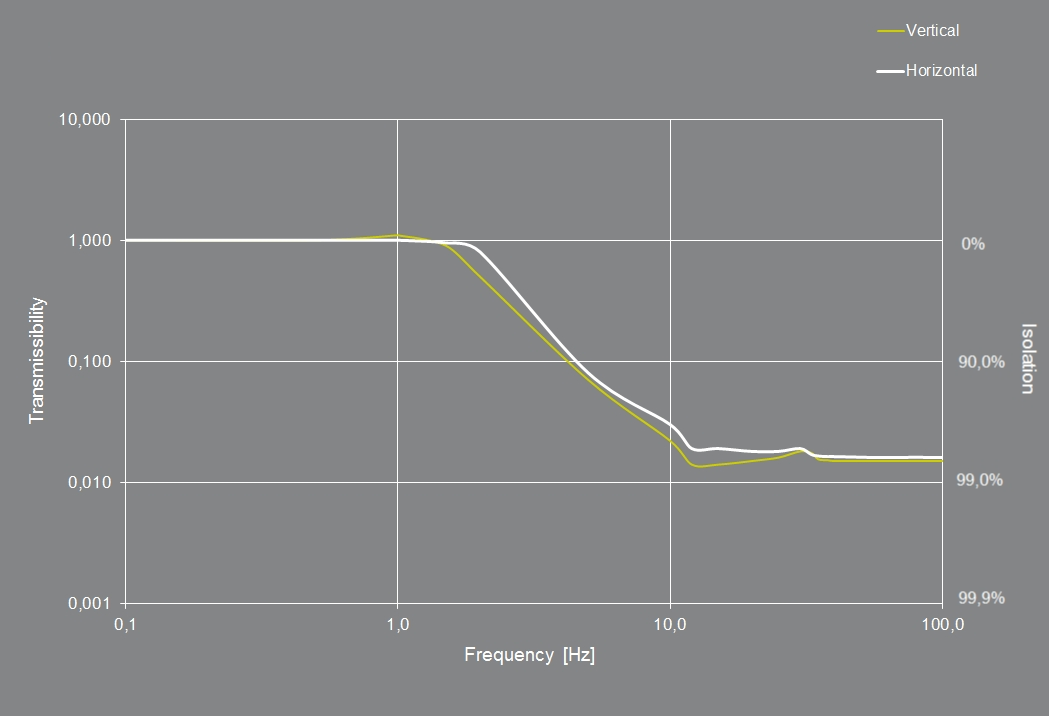
| Passive isolation platform | Applications needing a defined passive mechanism | Platform size, permitted load and centre of gravity | That all passive platforms have the same transmission behaviour |
| Pneumatic isolation | Applications using air-supported isolation | Air supply, pressure condition, levelling and maintenance access | That site air quality and supply are irrelevant |
| Active isolation | Sensitive instruments requiring an active system | Instrument, disturbance range, power, controller and acceptance condition | That active control is required or suitable for every microscope |
Room conditions and disturbance path
Floor vibration is only one possible disturbance path. Nearby centrifuges, pumps, fans, doors, HVAC equipment, traffic, personnel movement, cable tension and hoses can all affect a sensitive setup. A vibration-control selection therefore needs a description of the room and the instrument task. Avoid attaching stiff cables, piping or heavy accessories in a way that bridges the selected isolation interface. The table layout must preserve both the supported load path and any intentionally isolated path.
Load, centre of gravity and platform geometry
Some published microscopy-desk references list a 240 kg desk load, while separate isolation platforms publish their own smaller load windows. Neither value can be transferred automatically. Confirm the full installed mass, the microscope base dimensions, the centre of gravity, the position of monitors and accessories, and whether any item moves during operation. A selected platform may need a defined footprint or a central load zone that differs from the overall worktop size.
Acceptance method for sensitive work
For general laboratory use, the acceptance discussion may focus on height adjustment, stability, level, worktop condition and access. For sensitive imaging or manipulation, the project should state how suitability is judged: visual stability during the real procedure, a specified vibration test, the instrument supplier’s requirement, or a site commissioning protocol. This keeps the purchasing requirement connected to the actual microscopy task rather than to an undefined claim.
Accessories, Services and Installation Interface
The work surface is only one part of a functioning microscope workstation. The selected arrangement may include a monitor arm, keyboard support, task light, camera controller, foot switch, power distribution, cable tray, service post, shelf, drawer, specimen-accessory holder or a controlled interface to a vibration platform. Each item should be placed according to the operator’s normal movement rather than added after the base configuration has been fixed.
Worktop, frame and surface selection
The worktop material and edge treatment should suit the laboratory process, cleaning method, likely spills and installed equipment. A surface used for microscopy does not automatically require the same material as a wet chemistry table, a cleanroom workstation or a general teaching bench. The selected top must support the instrument mounting arrangement without local damage, sharp edges or unsupported cut-outs. Where a work recess, grommet or cable opening is needed, its position must be coordinated with the actual base and the services below.
Power, controls and communication equipment
Microscopes often require more than one power connection because camera, illumination, display, controller, heater, stage or computer equipment may be supplied separately. Define outlet type, electrical load, switch access, controller location and cable route before final release. Electrical accessories should remain reachable for service while avoiding a route that pulls across a moving-height frame or an isolation interface. A power strip mounted where a user cannot safely reach it does not improve the workstation.
Cable and hose management
Cables, fibre leads, data leads, gas lines and pneumatic hoses need sufficient movement allowance. This is especially important for adjustable-height configurations and for isolation systems: a cable that becomes tight at one height or bridges a supported platform can create a usability or performance problem. Plan the route from the instrument to the wall, floor, overhead service or local controller. Record the required slack and the points where each cable is restrained.
For monitor and keyboard support, check screen height, reach and viewing angle so that the display does not obstruct microscope work. For foot-operated controls, keep the lower zone and cable bend radius clear through the normal chair movement. For power and controller equipment, define the outlet rating, switching arrangement and service access. For every cable, hose and service route, retain a flexible path that avoids tension, trip hazards and an unintended rigid bridge across a selected isolation interface.
Cleaning and maintenance access
Microscope tables are often placed close to walls, imaging enclosures or service zones. Leave enough access for cleaning below the top, adjusting feet, servicing a height-control mechanism, checking a controller and removing the instrument when needed. Do not bury an electrical isolation switch, air regulator or adjustment point behind a fixed cabinet. Maintenance access is part of the installation envelope and should be reviewed with the selected overall dimensions.
Planning a changeable instrument setup
Some laboratories use one microscope table for more than one instrument over its service life. In that situation, identify which dimensions and accessories are permanent and which are adjustable. A removable monitor arm, movable cable support or replaceable worktop insert can help future changes, whereas a fixed cut-out designed around one base may limit later use. The table should not be made generic at the expense of the current task; it should retain only the flexibility that has a clear operating purpose. Record the supported equipment range, any limits on platform position and the accessories that must be retained when the microscope changes.
Applications, Microscopy Fit and Product Boundary
A laboratory microscope table can support routine inspection, sample documentation, teaching, biological observation, digital imaging, micromanipulation or specialist instrument work when its geometry and support condition match the actual method. The product name alone does not determine suitability. The application needs to identify how the operator sees the work, how the instrument is supported and whether stability must be assessed beyond ordinary bench rigidity.
Routine observation and teaching microscopy
For shared laboratory and teaching environments, the main priorities are often viewing height, durable worktop space, chair clearance, safe cable routing and a stable support frame. A fixed or adjustable microscope workstation can be configured around these needs. The selected worktop should also allow enough space for samples, notebooks, camera controls and cleaning materials without crowding the microscope base.
Imaging, documentation and digital microscopy
Digital imaging adds monitors, computers, camera controls, illumination and data connections. The layout should separate the viewing and documentation zone from the area where samples are handled. A monitor arm or shelf may improve visibility, but the additional load and cable movement must be included in the support plan. Where a room has noticeable disturbances, the project should identify whether the image-quality issue is due to instrument setup, lighting, software, floor movement or another cause before selecting an isolation option.
Micromanipulation and sensitive procedures
Micromanipulation, long exposure imaging and similarly sensitive work can require a more detailed assessment of vibration, air movement, building services and instrument installation. The selection may need a specified passive, pneumatic or active isolation configuration, but that decision belongs to the actual instrument and site condition. The chosen microscope table should describe the selected support mechanism, not imply that every frame has the same response.
Product boundaries and related workstations
An laboratory instrument table is a useful alternative when the equipment is not used as a microscope workstation and the main requirement is instrument support, service access or a specific equipment footprint. A laboratory wall bench or laboratory island bench is more appropriate when the requirement is a general perimeter or central laboratory work surface. Those products do not replace a microscope table when optical viewing geometry, accessory layout or a defined isolation interface drives the design.
Shared rooms and repeatable setups
In a shared microscopy room, repeatability is often as important as the maximum range of adjustment. Mark the normal chair position, monitor position and accessory locations where a procedure depends on them. A configuration may use memory height positions or a documented reference height, but users should still confirm that the optical viewing position and foot-control clearance remain appropriate after a change. This is particularly useful where different microscope heads, cameras or sample holders are exchanged on the same workstation.
When to request a project configuration
Request a project configuration when the microscope is unusually heavy, has a non-central centre of gravity, uses large camera or monitor equipment, needs an isolation platform, shares the workstation among different users, or requires fixed service interfaces. Supply the microscope drawing, mass, footprint, accessory list, room plan, desired working height, power or air requirements and the acceptance expectation. This allows the proposed frame, top, recess and support condition to be evaluated as one usable workstation.
The same review should identify whether the microscope must be relocated regularly, whether a service technician needs access from the rear, and whether the planned room finish permits stable levelling. These details affect the selected base, castors where applicable, floor interface and final placement.
Installation, Commissioning and RFQ
Installation begins with the selected workstation geometry and the actual room. Check the floor, available service route, door and lift access, wall clearance, chair approach, instrument moving path and the position of any nearby vibration contributor. A microscope table may look compact in plan view while its monitor arm, chair, controller, cable loop or adjustment mechanism requires a larger usable envelope.
Installation sequence
Position and level the frame before placing the worktop, platform and microscope. Install accessory supports, power and data management so that they remain accessible. If the configuration has height adjustment, move the table through its full travel with the intended equipment and cables in place. If it has an isolation interface, check that cables, hoses and accessories do not create an unintended rigid path between the supported equipment and the surrounding structure.
Commissioning checks
Commissioning should match the purchased configuration. An ergonomic workstation can be checked for height range, level, stability, work recess, lower-zone clearance, control access and cable movement. A selected vibration-control arrangement requires the additional checks stated for that mechanism and the agreed application. Do not accept an isolation-related requirement merely by observing that the table is heavy or that the microscope appears steady for a short period.
| RFQ input | Why it is needed | What the quotation should define | Site confirmation |
|---|---|---|---|
| Microscope and accessories | Establishes total load and footprint | Worktop, support points and accessory allowance | Model, mass and centre of gravity are current |
| Operator and operating sequence | Defines height, recess and reach | Fixed, manual or electric geometry | Chair range and operating position are available |
| Stability requirement | Separates rigid support from selected isolation | Support or isolation mechanism and limits | Room condition and acceptance method are agreed |
| Services and room layout | Prevents routing conflicts | Power, control, air and cable-management scope | Access path and service locations are confirmed |
Information required for a project-ready quotation
Provide the microscope model and drawing, total installed mass, base dimensions, centre of gravity where available, accessories, target worktop height, operator seating or standing requirement, preferred width and depth, work recess requirement, room layout, power and service details, and any vibration concern. State whether a fixed frame, manual adjustment, electric adjustment or a specific isolation mechanism is required. Include the required quantity and delivery destination.
What the delivered configuration should clarify
The quotation should state the selected table geometry, worktop and frame construction, adjustment arrangement where applicable, support or isolation scope, accessory positions, service interfaces, installation considerations and the items that remain subject to project confirmation. This creates a clear line between the reference information used for selection and the actual microscope workstation supplied for the project.
Frequently Asked Questions
Does every microscope table include vibration isolation?
No. A stable rigid microscope workstation and a workstation with passive, pneumatic or active vibration isolation are different configurations. The required support condition should be identified from the instrument, procedure and room environment.
Can an electric height-adjustable table be used for a microscope?
Yes, when its load, worktop, travel, recess, cable management and operating position are selected for the microscope arrangement. Electric height adjustment alone does not establish a vibration-isolation performance.
How should the table height be chosen?
Choose it from the operator’s seated or standing posture, microscope base height, eyepiece or display position, chair range and the required reach to controls and samples. The correct worktop height is not determined by a nominal desk dimension alone.
What information is needed for an isolation configuration?
Provide the instrument model, mass, footprint, centre of gravity, accessory arrangement, room condition, disturbance concern, available services and the way performance will be assessed. The selected isolation mechanism must be matched to those conditions.
Can monitors, foot switches and controllers be included?
Yes. Their positions, electrical requirements and cable movement should be included in the configuration request so that they do not obstruct the operator or interfere with the selected support arrangement.
Contact the Xicheng Engineering Team Today
Send the microscope model, installed equipment list, working-height requirement, laboratory layout and any stability concern. A configuration proposal can define the table geometry, support arrangement, accessories and quotation scope for the intended microscopy application.
Shenzhen Office: No. 34 Zhenxing Road (Shengtaian Heavy Industrial Park B), Loucun, Guangming New Dist, Shenzhen, Guangdong, China
WhatsApp: +86 18126478161
Engineering Mailbox: fanalax34@gmail.com