


Description
Bluetooth Fume Hood Control Panel for Local Operation and Setup
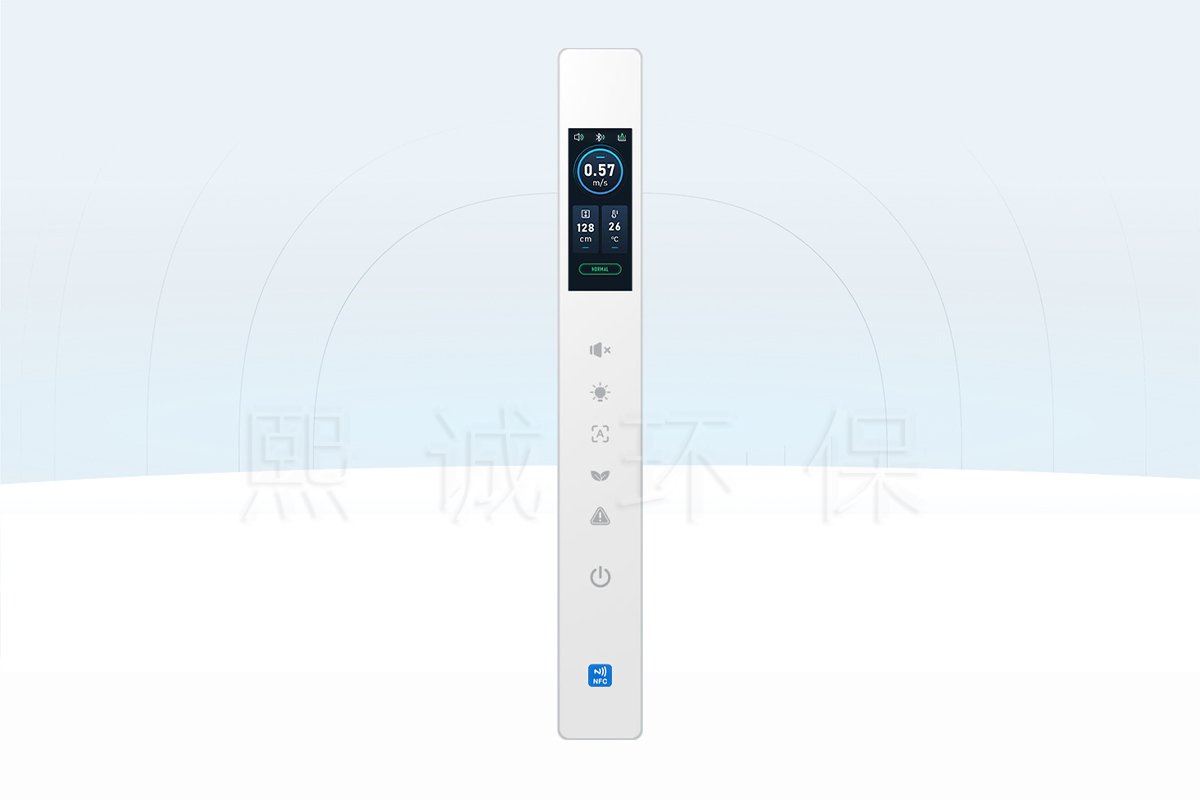
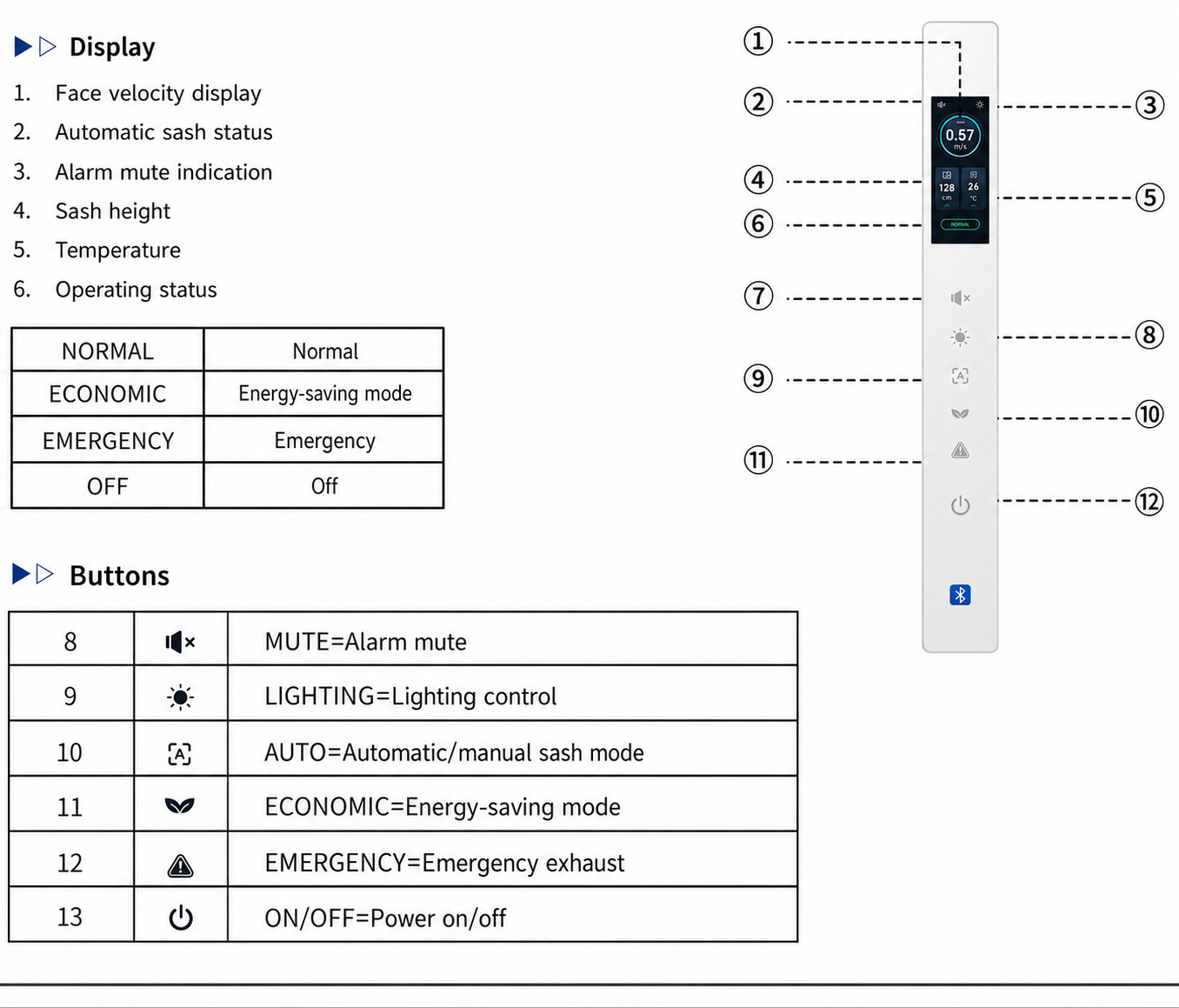
The FHM-L2 Bluetooth fume hood control panel is a dedicated user and service interface for compatible FHC-series controllers. At the hood, its color display presents face velocity, automatic sash status, sash height, temperature and operating state. Six touch keys provide the routine commands most likely to be needed without opening a setup menu.
Choose the FHM-L2 When
The panel is suited to projects that need local operator indication plus short-range mobile access for commissioning. Bluetooth lets authorized personnel inspect controller data and adjust supported parameters from an Android device near the hood. It is not a cloud dashboard and does not provide internet-based remote operation.
- The hood uses a compatible FHC-series controller.
- Local face-velocity, sash and temperature indication is required.
- Six dedicated commands are sufficient for normal operator use.
- Commissioning personnel need Bluetooth access to controller values and parameters.
- The fascia can accept the FHM-L2 cutout and rear connector clearance.
Operator Interface and Controller Responsibilities
The panel does not measure airflow or execute the control loop by itself. Sensors provide measurements to the FHC controller; the controller evaluates alarms and drives the valve, actuator or sash system; the FHM-L2 displays the resulting state and transmits operator commands. Bluetooth exposes the controller’s available service data but does not change this architecture.
Six Local Touch Commands
The keys provide alarm mute, lighting control, automatic/manual sash selection, energy-saving mode, emergency exhaust and power on/off. Each command acts through the configured controller sequence. For example, emergency exhaust should request the defined emergency state, while alarm mute should silence the sound without hiding the active alarm cause.
Key Specifications and Display Functions
| Selection Item | FHM-L2 Product Data |
|---|---|
| Product role | Local display, touch-command and Bluetooth setup panel for FHC controllers |
| Wired communication | RS-485 through RJ11-6P |
| Wireless function | Short-range Bluetooth access for Android setup app |
| Touch keys | 6 dedicated functions |
| Displayed values | Face velocity, sash status/height, temperature and operating state |
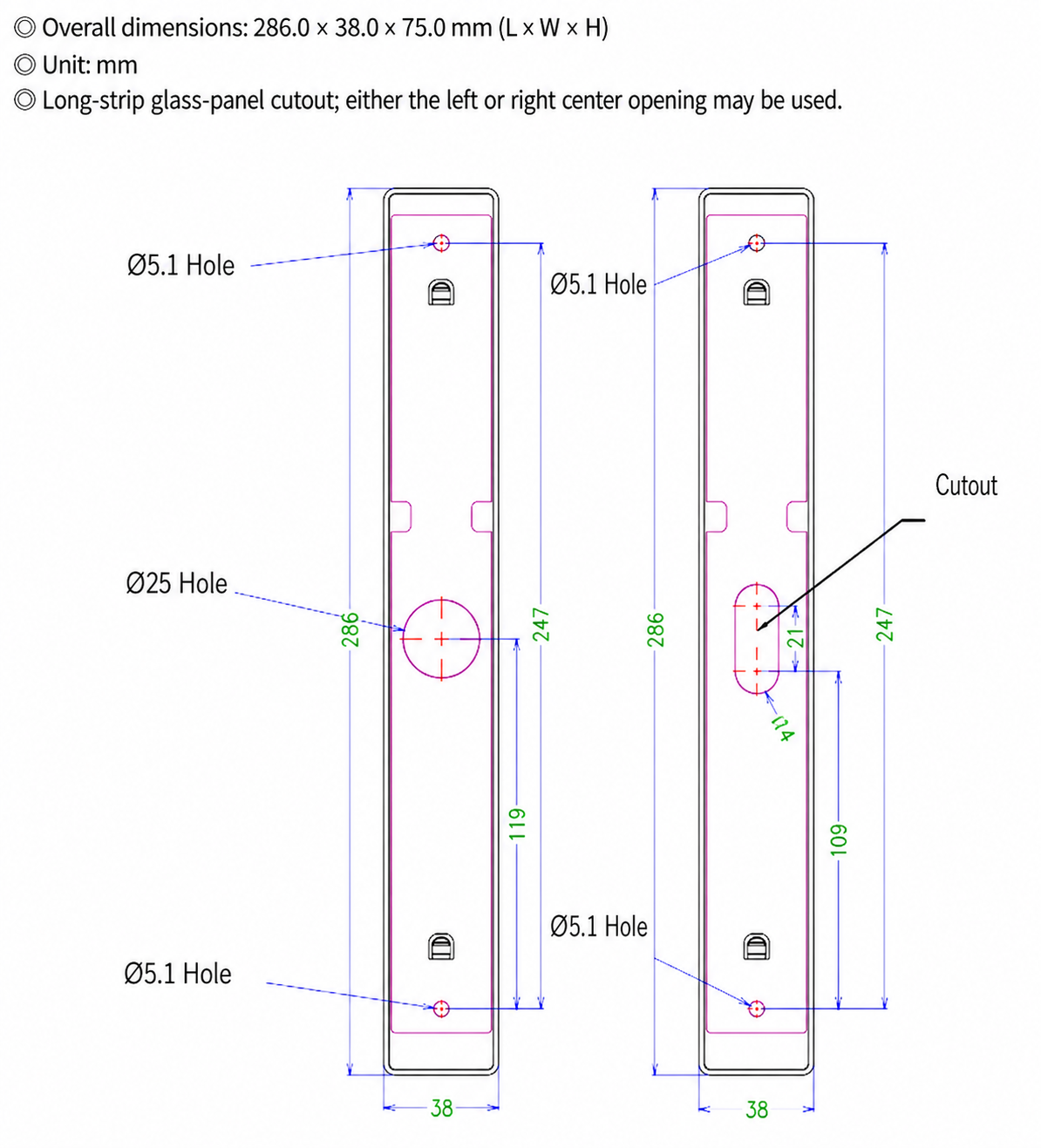
| Listed overall size | 286.0 x 38.0 x 75.0 mm (L x W x H) |
| Operating environment | 0-50 deg C; 10-90% RH, non-condensing |
| Referenced app package | FHM-L2_Bluetooth.apk version 1.1.1 |
Displayed States and Alarms
The screen identifies NORMAL, ECONOMIC, EMERGENCY and OFF states and can show face velocity, sash height and temperature. Alarm information can include low or high airflow, excessive sash opening and high exhaust temperature when those conditions are configured in the controller. The panel indicates the state; the sensor and controller establish whether the condition exists.
Bluetooth and NFC Are Not Interchangeable
The product instructions confirm Bluetooth and an Android installation package. They do not confirm NFC. A small wireless graphic on the panel must not be used as evidence of a second protocol. Specify and commission the product as a Bluetooth panel unless a separate model document explicitly adds another interface.
Listed Depth Requires Drawing Confirmation
The source lists 286.0 x 38.0 x 75.0 mm. Because rear clearance affects the fascia and connector space, use the listed value for planning and confirm the production drawing before cutting a cabinet. Do not assume that the final digit is a decimal-place error.
Bluetooth Connection and Access Control
Install the FHM-L2 Android package on the authorized service device. With the panel in the off state, press and hold the energy-saving key for three seconds to enable Bluetooth. A Bluetooth icon appears on the display. Open the app, grant the required local permissions, select the detected FHM-L2 device and enter the parameter page.
Use Bluetooth as a Commissioning Tool
The mobile view exposes operating values and setup parameters that can materially change hood behavior. Access should therefore be limited to trained commissioning or maintenance personnel. Laboratory users can operate the six local keys without receiving unrestricted parameter-editing access.
Connection Scope
Bluetooth requires the mobile device to be near the panel. The available evidence does not support cloud access, Wi-Fi control, remote internet diagnostics or an iOS app. If any of those functions are required, confirm a different controller or interface before specifying this panel.
Resolve Connection Problems in the Correct Order
If the app cannot find the panel, first confirm that the panel is in the off state and that the energy-saving key was held for the full three seconds. Check for the Bluetooth icon before troubleshooting the phone. Then confirm Android permissions, distance and whether another service device is already connected. Repeatedly resetting controller parameters is not an appropriate response to a discovery problem.
Record the Commissioned Configuration
After setup, record the controller address, baud rate, face-velocity setpoints, sash limits, sensor ranges, actuator signal range and automatic-sash timing that apply to the project. A phone screen is useful for commissioning, but it should not be the only record of the accepted configuration.
Include the panel model, app package version and controller firmware in the record. These identifiers help a future technician determine whether a changed screen layout or parameter list is caused by a different controller configuration, an updated app or a replaced panel.
Mobile Parameters and Commissioning Sequence
The app can expose groups of FHC controller data covering device state, measured face velocity, alarm status, valve pressure and airflow, actuator position, sash height, position-sensor output, automatic-sash state, occupancy, exhaust temperature, lighting, communication and control parameters. The exact fields depend on the connected controller and enabled system functions.
Verify Measurements Before Changing Setpoints
Start by confirming live sensor values and I/O states. Compare face velocity with the commissioning instrument, sash height with the physical opening, valve feedback with the actuator position and temperature with the installed sensor. Correct wiring or scaling errors before adjusting PID values, safety factors or operating setpoints.
The mobile list can show both a commanded value and a measured value for the same device. For example, valve opening setpoint and actual valve opening should not be treated as one field. A persistent difference can indicate actuator travel, feedback scaling or mechanical resistance and should be investigated before tuning the airflow loop.
Calibrate the Sash in Mechanical Order
Move the sash to the fully closed position and capture the position-sensor value and closing offset. Move it to the fully open position and enter the corresponding value, then enter the measured sash width and permitted maximum/minimum openings. Cycle the sash and verify intermediate positions before enabling automatic operation.
Next test the automatic/manual selection, direction setting, travel time, occupancy response and anti-pinch action. Confirm that the motor stops or reverses according to the defined sequence and that the local display follows the actual sash position. Do not use the mobile position value as the only proof that the path is clear.
Protect Safety-Related Parameters
Emergency behavior, anti-pinch action, occupancy delay, minimum exhaust percentage and face-velocity setpoints affect system response. Changes should follow the project sequence and be acceptance-tested at the hood. Bluetooth convenience does not reduce the need for documented authorization, change control and final functional testing.
Separate Service Data from Operator Information
The app can expose raw pressure, sensor-voltage, PID and communication values that are useful during setup but unsuitable as routine operator instructions. The local panel should present clear states and alarms, while the commissioning record explains the detailed parameters. This division reduces accidental adjustment and keeps the operator response focused on closing the sash, leaving the work area or requesting service when required.
Cutout Dimensions and Panel Installation
The cutout drawing shows a 286 mm long by 38 mm wide panel, 247 mm fixing spacing and two alternative center openings. Confirm the selected connector opening and rear clearance before machining the fascia.
Install the Baseplate Before the Front Panel
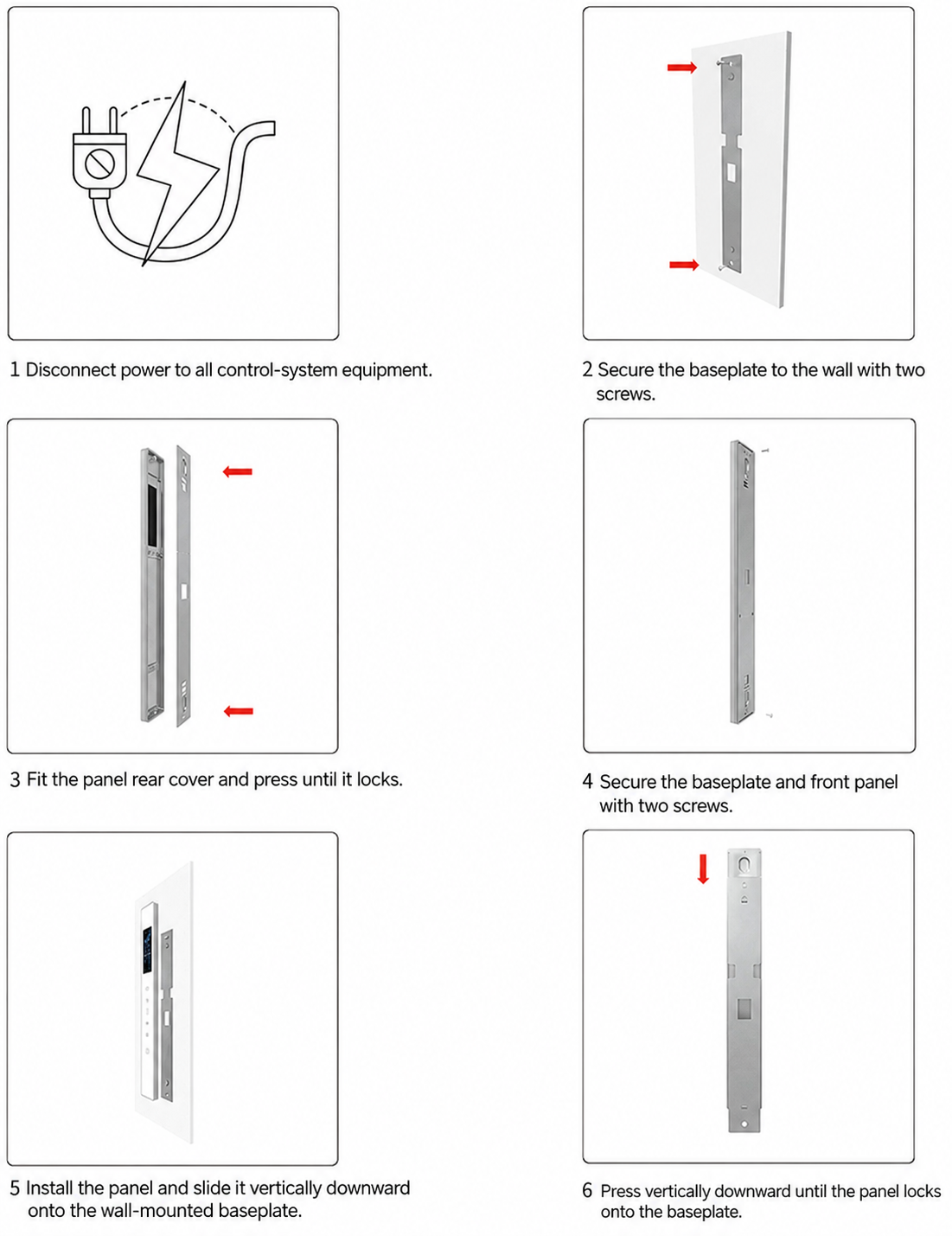
Disconnect the complete control system, secure the baseplate, fit the rear cover, attach the front panel and slide the assembly downward until it locks. Route the RJ11-6P cable without forcing the plug against the opening.
Post-Installation Checks
Verify that the panel is secure, all touch areas respond, RS-485 communication remains stable and Bluetooth can be enabled only by the intended procedure. Check that removal for service does not strain the connector cable.
Operate the sash and lighting while watching the display for communication interruptions. Motor and switching wiring can introduce interference if routed with the panel cable. If the screen resets or values become unstable during movement, inspect separation, shielding, grounding and connector retention before changing software parameters.
Selection, Compatibility and Related Panels
Choose the FHM-L2 when Bluetooth-assisted setup is required alongside a six-key local interface. Choose the glass touch fume hood control panel when eight direct local commands and its narrower 28.8 mm format are more important than mobile parameter access. For a larger monitoring-oriented interface, review the fume hood airflow monitor.
Information Needed Before Ordering
Provide the FHC controller model and firmware, Android setup requirement, enabled panel keys, displayed values, alarm sequence, automatic-sash scope, fascia drawing, connector opening, communication cable length and quantity. Confirm how commissioning credentials and parameter records will be controlled on site.
For a replacement, provide the old panel label, rear connector photograph, cutout dimensions and a controller screenshot. A Bluetooth icon or similar enclosure shape is not enough to prove compatibility. The replacement must preserve the wired protocol, connector pinout, available commands and controller-supported parameter map.
Not a Standalone Safety Device
The panel does not replace the face-velocity sensor, sash position sensor, obstruction sensor, controller, airflow valve or site acceptance test. It gives the operator and technician access to those system functions through the paired FHC controller.
After installation, acceptance should include normal operation, low/high airflow alarm, emergency exhaust, energy-saving mode, alarm mute, lighting, automatic/manual sash selection and power recovery. Test only the functions included in the actual hood configuration and document any disabled key.
Frequently Asked Questions
Does the FHM-L2 support Bluetooth?
Yes. The instructions describe Bluetooth activation and an Android FHM-L2 setup package.
Does it support NFC?
NFC is not confirmed. Specify Bluetooth only unless a separate model document explicitly states NFC support.
Can laboratory users change controller parameters?
Bluetooth parameter access should be restricted to authorized commissioning and maintenance personnel because the settings can change airflow and sash behavior.
Is the mobile connection cloud based?
No cloud or internet function is confirmed. The documented workflow is a local Bluetooth connection near the panel.
What does the panel control locally?
It provides mute, lighting, automatic/manual sash, energy-saving, emergency exhaust and on/off commands through the FHC controller.
Can it operate without an FHC controller?
No. It is a paired operator and setup interface, not a standalone airflow controller.
What size should be used for cabinet planning?
The source lists 286.0 x 38.0 x 75.0 mm. Confirm the production drawing and rear clearance before cutting the fascia.
Contact the Xicheng Engineering Team Today
Send the FHC controller model, firmware, required Bluetooth setup scope, display and key functions, automatic-sash sequence, fascia drawing and quantity. XICHENG will review compatibility, mounting and commissioning requirements and provide a product proposal and pricing within 24 hours.
Shenzhen Office: No. 34 Zhenxing Road (Shengtaian Heavy Industrial Park B), Loucun, Guangming New Dist, Shenzhen, Guangdong, China
WhatsApp: +86 18126478161
Engineering Mailbox: fanalax34@gmail.com